Affine HSV color manipulation
Because the need for color manipulation comes up fairly often in computer graphics, particularly transformations of hue, saturation, and value, and because some of this math is a bit tricky, here’s how to do HSV color transforms on RGB data using simple matrix operations.
Note: This isn’t about converting between RGB and HSV; this is only about applying an HSV-space modification to an RGB value and getting another RGB value out. There is no affine transformation to convert between RGB and HSV, as there is not a linear mapping between the two.
Preliminary
All of the operations here require multiplication of matrices and vectors. As a quick primer/refresher, multiplying a matrix with a vector looks like this:
\[ \begin{bmatrix} A_x & A_y & A_z \\ B_x & B_y & B_z \\ C_x & C_y & C_z \end{bmatrix} \begin{bmatrix} V_x \\ V_y \\ V_z \end{bmatrix} = \begin{bmatrix} A_xV_x + A_yV_y + A_zC_z \\ B_xV_x + B_yV_y + B_zC_z \\ C_xV_x + C_yV_y + C_zC_z \\ \end{bmatrix} \]
Matrix multiplication, like numerical multiplication, is associative, but unlike numerical mutiplication, is not commutative. This means that if you have multiple matrix operations to perform to a single vector, like \(v'=ABCDv\), you can combine them together into a single master matrix where \(Z=ABCD\) and then \(v'=Zv\). This will be useful later on.
A note about response curves
The math involved assumes that we are dealing with a linear color space. However, most displays use an exponential curve. For this to behave completely accurately, you’ll have to convert your colors to linear color before, and to exponential color afterwards. A pretty close approximation (assuming a display gamma of 2.2) is as follows, where \(L\) is the linear-space value, \(G\) is the gamma-space value, and \(M\) is the maximum value; for traditional 8-bit/channel images this is 255.
\[ L = M \left( \frac{G}{M} \right)^{2.2} \ \]
\[ G = M \left( \frac{L}{M} \right)^{0.455} \]
Note that if you are going to do this on a per-pixel basis in real time you will almost certainly want to precompute this as a lookup table. However, if you’re doing it in a GPU, treating gamma as 2 is Close Enough™, and you can just square or sqrt() for the conversions as appropriate.
For the remainder of the math, we don’t care about the scale of the values, as long as they start at 0.
Step 1: Convert RGB → YIQ
RGB values aren’t very convenient for doing complex transforms on, especially hue. The math for doing a hue rotation on RGB is nasty. However, the math for doing a hue rotation on YIQ is very easy; YIQ is a color space which uses the perceptive-weighted brightness of the red, green and blue channels to provide a luminance (Y) channel, and places the chroma values for red, green and blue roughly 120 degrees apart in the I-Q plane.
Note that there are many color spaces that you can use for this transform which have different hue-mapping characteristics; strictly-speaking, there is no single natural “angle” between any given colors, and different effects can be achieved by using different color spaces such as YPbPr or YUV. (An earlier version of this page used YPbPr for simplicity, but that led to much confusion when people expected the 180-degree rotation of red to be cyan, which is roughly the case in YIQ but not in YPbPr.)
The transformation from RGB to YIQ is best expressed as a matrix, with the RGB value multiplied as a \(1\times3\) vector on the right:
\[ T_{YIQ} = \begin{bmatrix} 0.299 & 0.587 & 0.114 \\ 0.596 & -0.274 & -0.321 \\ 0.211 & -0.523 & 0.311 \end{bmatrix} \]
One convenient property of the YIQ color space is that it is unit-independent, so we don’t have to care about what our range of colors is, as long as it starts at 0.
Step 2: Hue
Now that our color is in YIQ format, doing a hue transform is pretty simple – we’re just rotating the color around the Y axis. The math for this is as follows (where \(H\) is the hue transform amount, in degrees):
\[ \theta = \frac{H\pi}{180} \\ U = \cos(\theta) \\ W = \sin(\theta) \\ T_h = \begin{bmatrix} 1 & 0 & 0 \\ 0 & U & -W \\ 0 & W & U \end{bmatrix} = \begin{bmatrix} 1 & 0 & 0 \\ 0 & \cos(\theta) & -\sin(\theta) \\ 0 & \sin(\theta) & \cos(\theta) \end{bmatrix} \]
Step 3: Saturation
Saturation is just the distance between the color and the gray (Y) axis; you just scale the I and Q channels. So its matrix is:
\[ T_s = \begin{bmatrix} 1 & 0 & 0 \\ 0 & S & 0 \\ 0 & 0 & S \end{bmatrix} \]
Step 4: Value
Finally, the value transformation is a simple scaling of the color as a whole:
\[ T_v = \mathrm{I}V = \begin{bmatrix} V & 0 & 0 \\ 0 & V & 0 \\ 0 & 0 & V \end{bmatrix} \]
Step 5: Convert back to RGB
To convert YIQ back to RGB, it’s also pretty simple; we just use the inverse of the first matrix: \[ T_{RGB} = \begin{bmatrix} 1 & 0.956 & 0.621 \\ 1 & -0.272 & -0.647 \\ 1 & -1.107 & 1.705 \end{bmatrix} \]
Pulling it all together
The final composed transform \(T_{HSV}\) is \(T_{RGB}T_hT_sT_vT_{YIQ}\) (we compose the matrices from right-to-left since the original color is on the right), which you get by multiplying all the above matrices together. Because matrix multiplication is associative, it’s easiest to work out \(T_hT_sT_v\) first, which is
\[ \begin{bmatrix} V & 0 & 0 \\ 0 & VSU & -VSW \\ 0 & VSW & VSU \end{bmatrix} \]
where \(U\) and \(W\) are the same as in \(T_h\), above.
From here we can work out the master transform:
\[ T_{HSV} = \begin{bmatrix} 1 & 0.956 & 0.621 \\ 1 & -0.272 & -0.647 \\ 1 & -1.107 & 1.705 \end{bmatrix} \begin{bmatrix} V & 0 & 0 \\ 0 & VSU & -VSW \\ 0 & VSW & VSU \end{bmatrix} \begin{bmatrix} 0.299 & 0.587 & 0.114 \\ 0.596 & -0.274 & -0.321 \\ 0.211 & -0.523 & 0.311 \end{bmatrix} \] \[ = \begin{bmatrix} \left( .299V+.701VSU+.168VSW \right) & \left( .587V-.587VSU+.330VSW \right) & \left( .114V-.114VSU-.497VSW \right) \\ \left( .299V-.299VSU-.328VSW \right) & \left( .587V+.413VSU+.035VSW \right) & \left( .114V-.114VSU+.292VSW \right) \\ \left( .299V-.3VSU+1.25VSW \right) & \left( .587V-.588VSU-1.05VSW \right) & \left( .114V+.886VSU-.203VSW \right) \end{bmatrix} \]
As a quick smoke test, we test the matrix with \(V=S=1\) and \(H=0\) (meaning \(U=1\) and \(W=0\)) and as a result we get something very close to the identity matrix (with a little divergence due to roundoff error).
And what’s the code for this?
Here’s some simple C++ code to do an HSV transformation on a single Color (where Color is a struct containing three members, r, g, and b, in whatever data format you want):
Color TransformHSV(
    const Color &in,  // color to transform
    float h,          // hue shift (in degrees)
    float s,          // saturation multiplier (scalar)
    float v           // value multiplier (scalar)
) {
    float vsu = v*s*cos(h*M_PI/180);
    float vsw = v*s*sin(h*M_PI/180);

    Color ret;
    ret.r = (.299*v + .701*vsu + .168*vsw)*in.r
        +   (.587*v - .587*vsu + .330*vsw)*in.g
        +   (.114*v - .114*vsu - .497*vsw)*in.b;
    ret.g = (.299*v - .299*vsu - .328*vsw)*in.r
        +   (.587*v + .413*vsu + .035*vsw)*in.g
        +   (.114*v - .114*vsu + .292*vsw)*in.b;
    ret.b = (.299*v - .300*vsu + 1.25*vsw)*in.r
        +   (.587*v - .588*vsu - 1.05*vsw)*in.g
        +   (.114*v + .886*vsu - .203*vsw)*in.b;
    return ret;
}
What if I want to use someone else’s color transform matrix?
Let’s say you want to perfectly replicate the affine color transformation done by some other library or image-manipulation package (say, Flash, for example) but don’t know the exact colorspace they use for their intermediate transformation. Well, for any affine transformation (i.e. not involving gamma correction or whatnot), this is actually pretty simple. First, just run the unit colors of red, green, and blue through that color filter, and then those become the rows of your transformation matrix.
Code for that would look something like this:
Color TransformByExample(
    const Color &in,  // color to transform
    const Color &r,   // pre-transformed red
    const Color &g,   // pre-transformed green
    const Color &b,   // pre-transformed blue
    float m  // Maximum value for a channel
) {
    Color ret;
    ret.r = (in.r*r.r + in.g*r.g + in.b*r.b)/m;
    ret.g = (in.r*g.r + in.g*g.g + in.b*g.b)/m;
    ret.b = (in.r*b.r + in.g*b.g + in.b*b.b)/m;
    return ret;
}
Note that this only works for simple affine transforms, and the usual precautions about gamma vs. linear apply; a much more general approach is to use a CLUT, which can encode arbitrarily many color manipulations into a single color mapping image.
A note about gamut and response
The YIQ color space as used here (as well as in NTSC) attempts to keep the perceptive brightness the same, regardless of channel. This leads to some fairly major problems with the response range; for example, since pure green is perceived as about twice as bright as pure red, rotating pure green to red would produce a super-red – and meanwhile, the value on some channels can also be pulled down past 0. This is not a flaw in the algorithm, so much as a fundamental flaw in how color works to begin with, and a disconnect between the intuitive notion of how “hue” works vs. the actual physics involved. (In a sense, a hue “rotation” is a pretty ridiculous thing to even try to do to begin with; while red and blue shift are very real phenomena, there is no actual fundamental property of light or color which places red, green and blue at 120-degree intervals apart from each other.)
The easy solution to this issue is to always clamp the color values between 0 and 1. A more correct solution is to actually keep track of where the colors are beyond the range and spread that excess energy (or lack thereof) across the image (i.e. to neighboring pixels), such as in HDR rendering. As more display devices move to floating-point-based color representation, this will become easier to deal with. However, at present (May 2018), no commonly-supported image formats support anything other than a clamped integer color space (although there are a few emerging standards such as Radiance HDR and OpenEXR which are finally gaining traction).
In many cases, if you’re making heavy use of hue transformation (in e.g. a game), you are better off splitting your assets into different layers which you can tint appropriately and composite them together for display.
A reminder about gamma
As mentioned earlier, these equations only apply to linear color, whereas most image formats and displays assume an exponential color space. While an HSV transform will generally look accepetable on a gamma colorspace, it tends to bias things weirdly and won’t look quite right. So, you probably want to convert your gamma RGB values to linear before you apply the HSV transform:
float LinearToGamma(float value, float gamma, float max) {
    return max*pow(value/max, 1/gamma);
}

float GammaToLinear(float value, float gamma, float max) {
    return max*pow(value/max, gamma);
}
In this case, both the linear and gamma colors will be stored in the same range \( \left(0,max\right) \). In real-world real-time implementations you will probably do this transformation using either a pair of lookup tables or a polynomial approximation so you don’t have to do multiple pow() calls per pixel. (Or, better yet, convert your assets to be linear in the first place.)
What about Photoshop’s HSL adjustments?
Photoshop does not use a linear transform to do its HSL adjustments. Instead, it does an ad-hoc “intuitive” approach where it uses the lowest channel value to determine the saturation, and uses the ratio between the remaining two channels to determine the “angle” on the traditional 6-spoke print color wheel (red/yellow/green/cyan/blue/magenta). This provides perfect numeric values based on peoples' expectations of hues vs. RGB channels, but it actually makes for some pretty terrible chroma adjustment which tends to only work well on solid colors. Even smooth gradients between two colors are completely fouled up by this approach.
This can be seen clearly in this side-by-side comparison; notice the severely obvious banding on the Photoshop version:
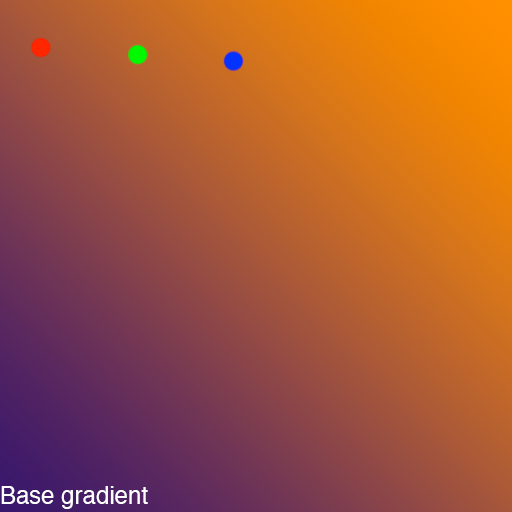
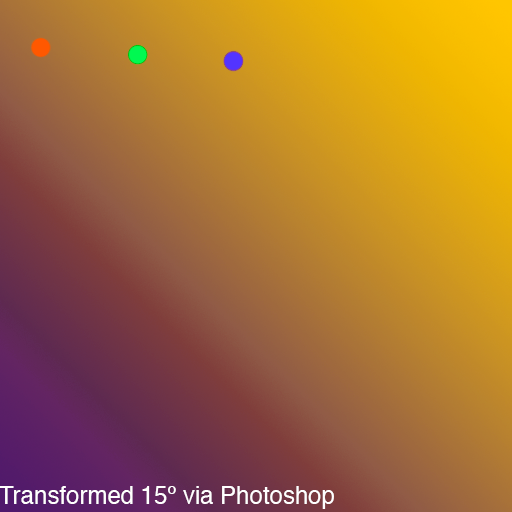
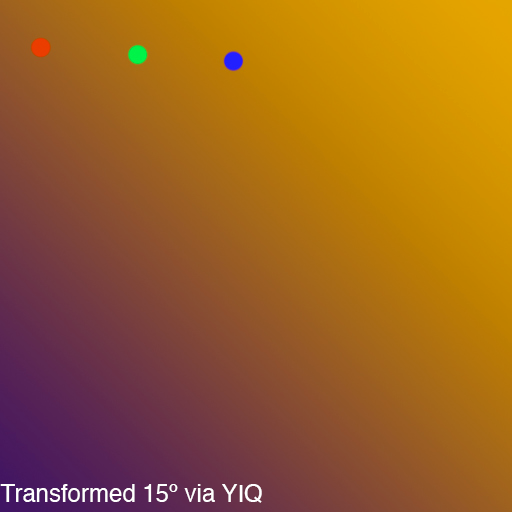
In my opinion, Photoshop’s HSL transform mechanism isn’t really something that should be emulated since its utility is limited to begin with.
Comments
To see the comments on this entry, please log in. Alternately, send me an email, or join me on Discord!